FieldStation42 has two types of guide channels.
The classic guide is built directly into the player. It renders a scrolling schedule grid using Python and Tkinter, supports rotating messages and images in the header, and plays background music. It is configured entirely through JSON and has no external dependencies beyond the base install.
The custom guide is a web-based guide that runs inside FieldStation42's web channel component. It comes with three decade-themed visual styles (80s, 90s, 00s), supports background music, video panels, and rotating text messages, and can be extended with your own CSS themes. It requires the web channel dependencies to be installed.
For quick copy-paste configs for both types, see Recipe 5 in the Channel Recipes guide.
Classic Guide Channel
The classic guide is the simplest option. Set network_type to "guide" and point it at your FieldStation42 server. The example config is the best starting point:
cp confs/examples/guide.json confs/
Basic Configuration
{
  "station_conf": {
    "network_name": "Guide",
    "network_type": "guide",
    "channel_number": 3,
    "play_sound": true,
    "sound_to_play": "runtime/guide_music/",
    "scroll_speed": 1.0,
    "messages": ["FieldStation42", "Cable Entertainment"],
    "images": ["runtime/guide/image0.png", "runtime/guide/image1.png"]
  }
}
sound_to_play accepts a single file, a directory (shuffles and loops), or a list of files. The upper section of the guide rotates between images on the left and messages on the right. If you use both, match the count so they stay in sync.
Messages and Images
Images appear in the upper left; messages appear in the upper right. Both rotate at message_rotation_rate seconds. To keep them in sync, use the same number of images and messages.
Messages support newlines (\n) for two-line display:
{
  "station_conf": {
    "network_name": "Guide",
    "network_type": "guide",
    "channel_number": 3,
    "content_dir": "catalog/guide_content/",
    "messages": [
      "FieldStation42\nCable Entertainment",
      "Cheers!\nFrom us to you!",
      "FieldStation42 Guide\nOn cable mode."
    ],
    "images": [
      "runtime/guide/image0.png",
      "runtime/guide/image1.png",
      "runtime/guide/image2.png"
    ]
  }
}
Make sure all image paths exist before starting. A missing file will prevent the guide from launching.
For a full list of layout, font, color, and sizing options, see the Classic Guide Appearance Reference at the bottom of this page.
Custom Guide Channel
The custom guide runs as a web channel pointed at the built-in guide endpoint. All configuration is in the URL.
{
  "station_conf": {
    "network_name": "Guide",
    "network_long_name": "Guide Channel",
    "channel_number": 3,
    "network_type": "web",
    "web_url": "http://localhost:4242/static/customguide/customguide.html?theme=90s&slots=3"
  }
}
This requires the web channel dependencies. See Recipe 7: Web Channel for setup instructions.
URL Parameters
All custom guide configuration is passed as URL parameters:
| Parameter | Default | Description |
|---|---|---|
theme |
80s |
Theme name. Loads themes/{name}.css. Falls back to 80s if not found. |
slots |
3 |
Number of 30-minute time slots to show in the grid. |
header |
(from CSS) | Text shown in the header bar. Overrides the theme's --header-text variable. |
pause |
(from CSS) | Scroll pause duration in seconds. Overrides the theme's --scroll-pause. |
music |
none | Path to a music directory relative to the project root (e.g. runtime/guide_music/). |
messages |
none | Path to a messages JSON file (e.g. runtime/messages.json). Used by grid-mode themes. |
videos |
true |
Set to false to hide the video panel in grid-mode themes. |
mock |
off | ?mock=1 generates fake schedule data for local testing without a server connection. |
Decade Themes
80s
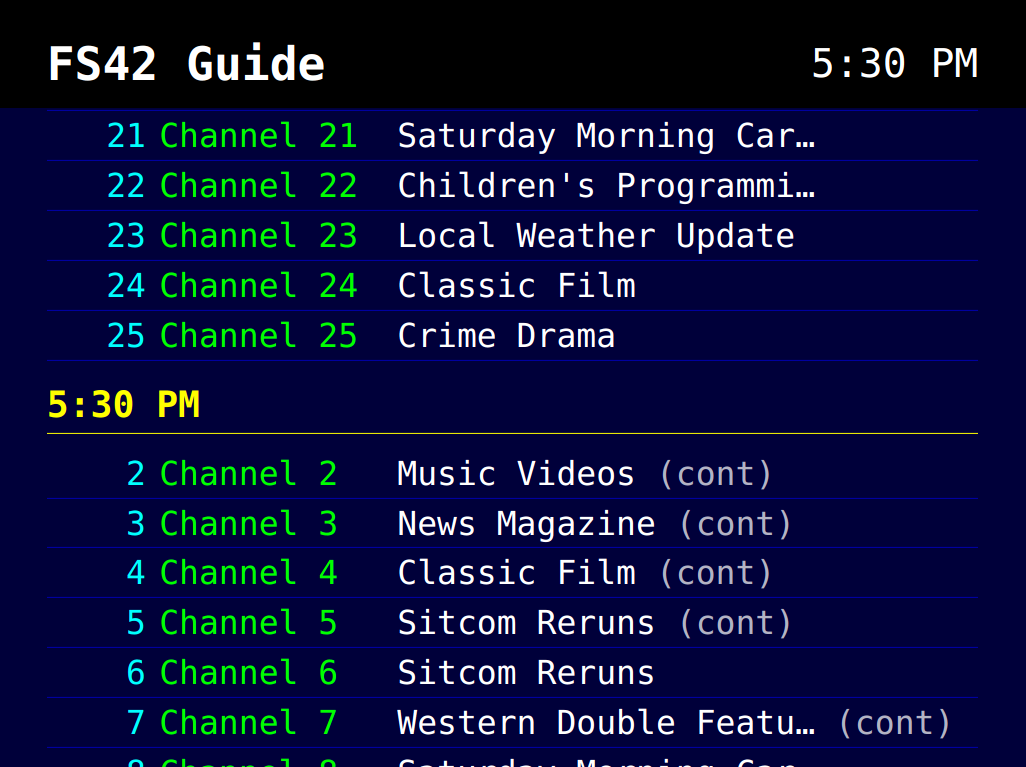
Vertical scrolling list. Channels are grouped under time-slot headings and scroll continuously from top to bottom, pause, then rebuild with fresh data.
Deep navy background, CGA-palette colors: cyan channel numbers, green channel names, yellow time headings, white titles. Monospace font. No video panel.
Background music loads automatically if a ?music= directory is provided, or falls back to a bundled music_playlist.json if present in the customguide static directory.
90s
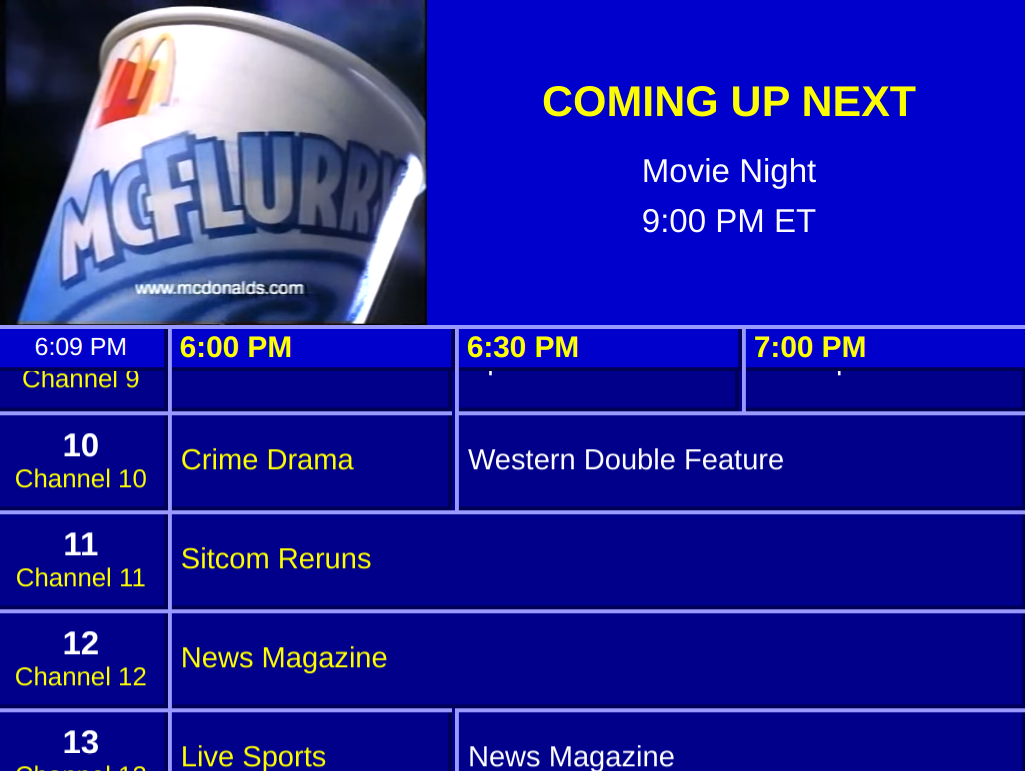
Split-screen layout. The top section has a video player on the left cycling through clips and a rotating text carousel on the right. The bottom is a horizontal schedule grid.
Deep blue palette, yellow time headings and channel names, white titles. Boxy flat blocks with a faint raised-relief border. Matches the look of late-90s digital cable guide channels.
Expects 4:3 aspect ratio video clips. Music only plays if ?music= is passed.
00s
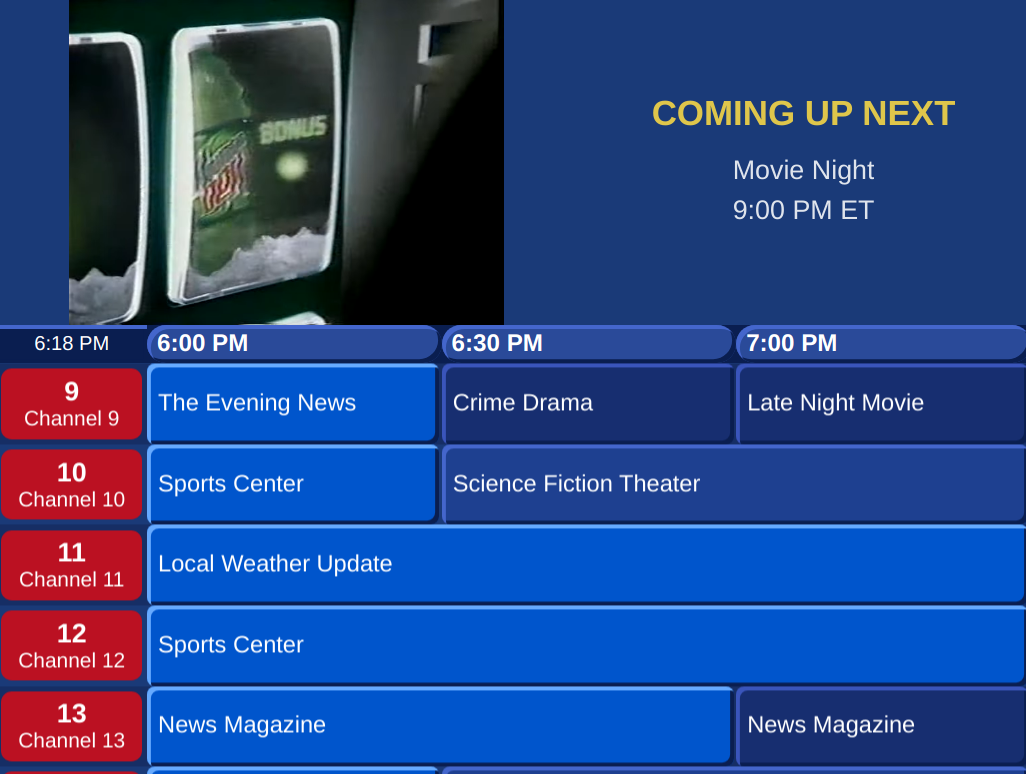
Same split-screen layout as 90s. Red rounded channel pills, pill-shaped time slot labels, rounded program blocks. Cleaner and more polished. Matches early-2000s digital cable guide aesthetics.
Expects 16:9 aspect ratio video clips. Music only plays if ?music= is passed.
Assets
Music
Put audio files in any directory under runtime/ and pass the path via ?music=:
runtime/
  guide_music/
    track1.mp3
    track2.ogg
...&music=runtime/guide_music/
Supported formats: .mp3, .ogg, .wav, .flac, .aac, .m4a, .opus
Videos (90s and 00s themes)
Put video files in runtime/guide_videos/. This directory is scanned automatically with no URL parameter needed. If the directory is empty the video panel hides itself.
runtime/
  guide_videos/
    promo1.webm
    bumper2.webm
The guide runs inside Qt WebEngine (Chromium-based), which on Linux does not support H.264 MP4 without additional GStreamer plugins. Convert your videos to WebM/VP9 first:
ffmpeg -i input.mp4 -c:v libvpx-vp9 -crf 33 -b:v 0 -c:a libvorbis output.webm
WebM/VP9 works reliably in Qt WebEngine on Raspberry Pi and desktop Linux.
Text Messages (90s and 00s themes)
The text carousel in the info panel loads from a JSON file. Pass the file path via ?messages=:
{
  "messages": [
    {
      "title": "Coming Up Next",
      "body": "Classic films all afternoon on Channel 7.",
      "duration": 10
    },
    {
      "title": "Did You Know?",
      "body": "FieldStation42 supports over 50 channels.",
      "duration": 8
    }
  ]
}
title: displayed in the accent color. HTML is allowed.body: displayed in white. Plain text only.duration: seconds to show this message. Defaults to the theme's--text-carousel-speed(10 seconds).
If no messages file is provided, the panel shows "FieldStation42" as a static placeholder.
Creating a Custom Theme
A theme is a single CSS file placed in fs42/fs42_server/static/customguide/themes/. The filename is the theme name: mytheme.css is loaded with ?theme=mytheme.
The theme sets CSS custom properties on :root. The structural CSS uses these variables with sensible fallbacks, so you only need to define what you want to change.
Layout mode
--layout-mode: "list";   /* 80s-style scrolling list */
--layout-mode: "grid";   /* 90s/00s-style split-screen grid */
This is the most important variable. It controls which DOM layout the JS builds at startup.
Music autoload
--music-autoload: true;   /* fall back to bundled music_playlist.json if ?music= not passed */
--music-autoload: false;  /* only play music if ?music= URL param is set */
CSS Variables Reference
Layout and behavior
| Variable | Purpose |
|---|---|
--layout-mode |
"list" or "grid" |
--music-autoload |
true or false |
--header-position |
top or bottom |
--channel-position |
before or after (list mode) |
--header-text |
default header bar text |
--continued-indicator |
text appended for shows that started before the visible slot |
--offair-text |
text shown when no schedule data exists |
Colors
| Variable | Purpose |
|---|---|
--bg-color |
page background |
--text-color |
default text |
--header-bg |
header bar background |
--header-text-color |
header bar text |
--time-heading-color |
time slot label color |
--channel-number-color |
channel number text |
--channel-name-color |
channel name text |
--show-title-color |
show title text |
--row-divider-color |
border between listing rows |
Typography and spacing
| Variable | Purpose |
|---|---|
--font-family |
font stack |
--font-size |
base font size |
--h-padding |
horizontal inset (useful for CRT overscan) |
--v-padding |
vertical inset |
Scrolling (list mode)
| Variable | Purpose |
|---|---|
--scroll-pause |
seconds to pause at the top before scrolling (e.g. 5s) |
--scroll-speed |
pixels per 50ms tick (e.g. 0.8) |
Audio
| Variable | Purpose |
|---|---|
--music-volume |
playback volume 0.0 to 1.0 |
Grid mode: top panel
| Variable | Purpose |
|---|---|
--top-panel-height |
height of the video and text info panel (e.g. 42%) |
--video-side |
left or right |
--video-aspect-ratio |
aspect ratio of the video panel (e.g. 4/3 or 16/9) |
--video-width |
explicit video panel width; set to auto to use aspect ratio |
--video-panel-bg |
background behind the video |
--text-panel-bg |
background of the text carousel |
--text-panel-color |
body text color in the carousel |
--text-panel-title-color |
title text color in the carousel |
--text-carousel-speed |
default message display time in seconds |
Grid mode: channel column
| Variable | Purpose |
|---|---|
--grid-channel-bg |
channel cell background |
--grid-channel-width |
width of the channel column (e.g. 5.25em) |
--channel-pill-radius |
border radius of channel cells |
--channel-pill-margin-v |
vertical margin around channel cells |
--channel-pill-margin-h |
horizontal margin around channel cells |
--channel-block-border |
border highlight color on channel cells |
--channel-block-shadow |
border shadow color on channel cells |
Grid mode: header and time slots
| Variable | Purpose |
|---|---|
--grid-header-bg |
background of the time-slot header row |
--time-slot-bg |
background of individual time slot labels |
--time-slot-radius |
border radius of time slot labels |
Grid mode: program blocks
| Variable | Purpose |
|---|---|
--grid-row-height |
height of each channel row |
--grid-row-odd-bg |
background of odd-numbered rows |
--grid-row-even-bg |
background of even-numbered rows |
--program-block-bg |
program block background (odd rows) |
--program-block-border |
program block highlight edge |
--program-block-shadow |
program block shadow edge |
--program-block-radius |
program block border radius |
--program-block-even-bg |
program block background (even rows) |
--program-block-even-border |
program block highlight edge (even rows) |
--program-current-bg |
background of the currently-airing block |
--program-current-border |
border color of the currently-airing block |
--program-current-color |
text color of the currently-airing block |
Classic Guide Appearance Reference
All of these can be overridden directly in your station config alongside network_type and the other standard fields.
| Property | Default | Description |
|---|---|---|
fullscreen |
false |
true ignores width/height and fills the screen |
width |
720 |
Window width in pixels |
height |
480 |
Window height in pixels |
window_decorations |
false |
true shows a normal window frame (useful for debugging) |
top_bg |
"blue3" |
Background color of the upper panel |
bottom_bg |
"blue4" |
Background color of the schedule grid |
pad |
10 |
Padding around content in pixels |
messages |
[...] |
List of messages to rotate in the upper right |
message_rotation_rate |
10 |
Seconds between message/image rotations |
message_fg |
"white" |
Message text color |
message_font_family |
"Arial" |
Message font |
message_font_size |
25 |
Message font size |
images |
[] |
List of image paths to rotate in the upper left |
network_font_family |
"Arial" |
Channel name font |
network_font_size |
12 |
Channel name font size |
network_width_divisor |
6 |
Controls the width of the channel name column |
schedule_font_family |
"Arial" |
Schedule text font |
schedule_font_size |
12 |
Schedule text font size |
schedule_highlight_fg |
"yellow" |
Color for the currently-airing show |
schedule_fg |
"white" |
Schedule text color |
schedule_border_width |
4 |
Border width on schedule cells |
schedule_border_relief |
"raised" |
Tkinter relief style for schedule cells |
footer_messages |
[...] |
Messages that scroll along the bottom ticker |
footer_height |
50 |
Height of the footer bar in pixels |
schedule_row_count |
3 |
Number of channels visible at once |
top_section_ratio |
0.5 |
Fraction of the window used by the upper panel |
target_row_height |
60 |
Preferred height for each channel row |
min_row_height |
45 |
Minimum row height |
max_row_height |
75 |
Maximum row height |
normalize_title |
true |
Clean up show titles for display |
Color values use Tkinter color names (e.g. "blue3", "white", "yellow") or hex strings (e.g. "#1a1a2e").